Multi Lines Brushes for Procreate: Efficient Line Art Tools
In the world of digital design, efficiency is just as important as creativity. Whether you are a professional illustrator, a social media manager creating daily content, or a crafter designing custom stationery, the tools you choose directly impact your workflow. I recently integrated the Multi Lines Brushes for Procreate into my toolkit, and they have fundamentally changed how I approach line work and pattern creation. This isn't just another set of generic pens; it is a specialized bundle designed to add depth, rhythm, and texture to your digital canvas with a single stroke.
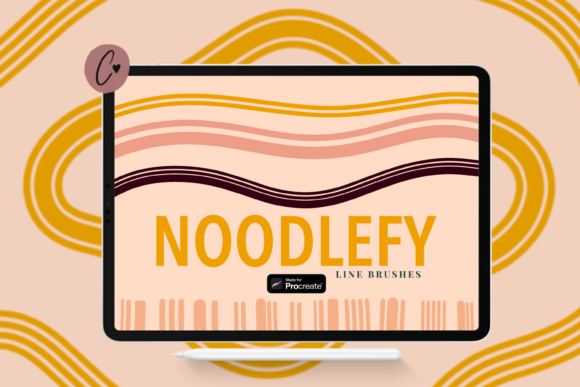
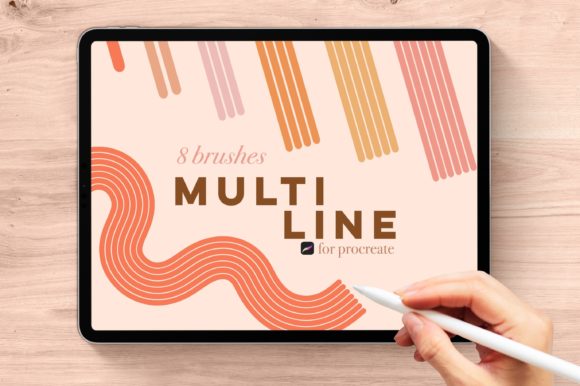
It is important to establish the technical foundation of this product immediately. These brushes are designed exclusively for the Procreate app on iOS devices. They will not function in Adobe Illustrator, Photoshop, Affinity Designer, or any other software. If you are an iPad user who relies on the Apple Pencil for your design work, this bundle is tailored specifically for your hardware. The collection includes seven distinct monoline brushes—ranging from a single line to seven parallel lines—plus a special bonus brush called "BETH." The visual personality of these brushes is defined by precision and uniformity. They create clean, geometric structures that feel modern and organized, yet they retain the organic hand-drawn quality that digital artists strive for.
Practical Applications for Designers and Creators
The true value of the Multi Lines Brushes for Procreate lies in their versatility across different creative industries. For those working in brand identity and logo design, these brushes offer a way to create intricate monograms or background textures that stand out. Instead of manually drawing parallel lines and worrying about consistent spacing, you can use the "BROOKE" (7-line) brush to instantly fill a shape with a hatched texture that looks professionally rendered. This is a massive time-saver for designers who need to produce high-quality mockups quickly.
If you are involved in editorial design or publishing, consider how these brushes can elevate your layouts. In magazine layouts or book covers, line work is often used to separate sections or create visual interest. Using the "OLIVIA" (4-line) or "KYRA" (5-line) brushes allows you to create bold borders that draw the reader's eye without overwhelming the typography. Because these are monoline brushes, they pair exceptionally well with both serif fonts and sans serif fonts, providing a stable visual anchor for your text.
For the crafting community, particularly those selling on platforms like Etsy, the utility is immediate. Imagine creating a digital planner or a set of stickers. The "DANA" (2-line) brush is perfect for creating underlines for headers or creating a "stitching" effect on digital paper elements. Furthermore, social media graphics often suffer from a lack of texture. By using the "TAYLOR" (3-line) brush to create custom dividers or accent marks in your Instagram stories, you add a layer of professionalism that generic templates cannot match.
Enhancing Visual Hierarchy and Readability
One of the core principles of modern typography and design is visual hierarchy—guiding the viewer's eye to the most important information first. The Multi Lines Brushes for Procreate are excellent tools for establishing this hierarchy. When you use a thicker, multi-line brush like "ELIZA" (6 lines) for a headline background or a focal point, it creates a heavy visual weight. Contrast this with the "SADIE" (1-line) brush for finer details, and you instantly create a clear distinction between primary and secondary elements.
Readability is another critical factor, especially in packaging design and web design. While these brushes are display and creative assets rather than body text tools, they influence the readability of the surrounding content. For example, using a multi-line brush to create a textured background behind white text can sometimes make the text hard to read if the lines are too close together. However, if you use the "KYRA" brush with a lower opacity or a lighter color, you can create a subtle paper texture that actually helps the foreground text pop. It is about finding the balance between the energy of the brush and the clarity of the message.
Exploring the Bonus Features and Specific Styles
The bundle includes a specific hierarchy of brushes, named for easy recall: SADIE (1 line), DANA (2 lines), TAYLOR (3 lines), OLIVIA (4 lines), KYRA (5 lines), ELIZIA (6 lines), and BROOKE (7 lines). This range covers almost any thickness requirement you might have. The consistency between the brushes ensures that your work looks cohesive; you can switch from a 1-line detail to a 7-line border without the style feeling disjointed.
However, the standout feature of this set is the bonus brush, BETH. BETH is similar to the Eliza brush but includes dynamic color-changing capabilities. Please note that BETH only works with an Apple Pencil or an iPhone with 3D Touch. This brush is not just a static tool; it reacts to pressure and movement to shift colors, creating a gradient or "rainbow" effect within the multi-lines. This is incredibly useful for creating eye-catching handwritten font style headers or artistic illustrations where you want to avoid the flat look of standard digital ink. It adds a level of personality and flair that is difficult to achieve manually, making it a favorite for personal projects or standout marketing materials.
Integrating Brushes into Your Workflow
Adopting new design assets requires a bit of experimentation. When you first download the Multi Lines Brushes for Procreate, I recommend spending ten minutes just doodling with each brush on a blank canvas. Get a feel for how the "SADIE" brush handles fine lettering versus how the "BROOKE" brush fills large spaces. Consider how these tools fit into your existing font pairing strategies. If you typically use a bold sans serif font for headers, try using the "DANA" brush to create a double underline that matches the weight of the font.
For those concerned with licensing and commercial use, always review the terms provided by the creator. Generally, brushes like these are royalty-free for commercial projects, meaning you can use them in client work, merchandise, and digital products. However, you cannot resell the brushes themselves. This makes them a smart investment for freelancers and small business owners who need to keep their content fresh without constantly buying new software.
Ultimately, the Multi Lines Brushes for Procreate are about expanding your creative vocabulary. They allow you to add complexity and rhythm to your work with minimal effort. Whether you are sketching a new logo design, laying out a magazine spread, or designing a custom t-shirt, these brushes provide a reliable, high-quality foundation for your line work. They bridge the gap between technical precision and artistic expression, making them an essential addition to any serious digital artist's library.