72 Brilliant Paints Illustrator Brushes for Digital Art
As a designer, you know the difference between a flat vector graphic and one that feels tactile and alive often comes down to texture. Standard vector tools are clean and precise, but they can lack the warmth and spontaneity of real-world media. This is where a specialized asset like the 72 Brilliant Paints Illustrator Brushes changes the game. This collection is not just a set of strokes; it is a toolkit for infusing your vector art with the rich, glossy, and dynamic character of metal acrylic and oil paints. It bridges the gap between digital precision and organic artistry.
The Visual Character: More Than Just Strokes
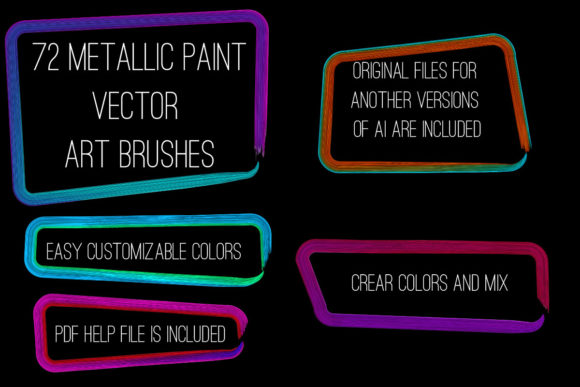
Understanding what makes this collection effective requires looking at its personality. The brushes are designed to mimic the behavior of heavy body paints and metallic pigments. You get a range of 72 variants, covering brilliant brights and subtle pale tones. The visual appeal lies in their ability to create glossy smears, textured swabs, and flowing ribbon effects that feel authentic. Unlike generic software brushes, these are crafted for specific decorative outcomes. They allow you to produce intricate frieze patterns or bold edging with a single drag of the stylus. The "personality" of these brushes is expressive and luxurious, making them ideal for projects that need to convey quality, creativity, or a handcrafted aesthetic. They turn simple paths into complex, multi-tonal brushstrokes without requiring advanced illustration skills.
Strategic Applications Across Industries
The value of a premium design asset lies in its versatility. The 72 Brilliant Paints Illustrator Brushes are compatible with Illustrator CS6 and above, making them accessible to a wide range of professionals. Here is how different creators can leverage them:
- Branding and Logo Design: For businesses that want to project a brand identity rooted in creativity or artisanal quality, these brushes offer a unique advantage. A logo constructed with these metallic strokes can suggest sophistication or energy, depending on the color palette used. It moves a brand away from the sterile look of standard sans serif font logos toward something with visual depth.
- Packaging Design: In the competitive world of packaging design, shelf appeal is everything. Using these brushes to create decorative borders, frames, or background textures can make a product stand out. The metallic finish mimics real foil stamping or embossing digitally, allowing for realistic mockups and final artwork that screams premium quality.
- Editorial and Publishing: Magazines, book covers, and digital publications often rely on striking editorial design to capture attention. These brushes can be used to create custom drop caps, section dividers, or full-page illustrations that complement a bold serif font or a clean script font. They add a layer of visual interest that stock photography cannot match.
- Digital Marketing and Social Media: In the fast-scrolling environment of social media, static graphics often get ignored. The dynamic nature of these paint strokes can create social media graphics that stop the scroll. Whether it is a textured background for a quote or a bold stroke to highlight a call to action, they add the "thumb-stopping" power needed for engagement.
Enhancing Visual Hierarchy and Audience Engagement
Typography and illustration must work in tandem. A common mistake in modern typography is treating text and graphics as separate entities. By using the 72 Brilliant Paints Illustrator Brushes, you can create a more cohesive visual hierarchy. For instance, a heavy, textured brushstroke can anchor a headline, drawing the eye immediately to the most important message. This technique works particularly well when paired with contrasting typefaces—imagine a delicate handwritten font sitting atop a rough, metallic paint smear. This contrast creates tension and interest.
Furthermore, these brushes influence brand perception. In a digital landscape dominated by flat design and vector gradients, texture signals authenticity. It suggests that a human hand was involved in the creation process. This is a subtle psychological trigger for audiences ranging from 20 to 50 who appreciate craftsmanship. It builds recognition because the visual style is distinct and harder to replicate than standard digital shapes.
Practical Implementation and Workflow
Adopting new design assets should streamline your workflow, not complicate it. The inclusion of Ai Illustrator 10 and EPS 10 files ensures backward compatibility, but the real strength lies in the flexibility of the brushes. Here is how to integrate them effectively:
- Evaluate Project Fit: Before applying these brushes, consider the project's tone. They are excellent for creative, artistic, and luxury sectors but might be too expressive for a corporate banking report. Use them where personality is a priority.
- Customization is Key: The prompt mentions you can easily change the color, size, or thickness. Do not use the default settings. Adjust the color to match your client's specific hex codes. Scale the brushes to fit the composition. A premium font or brush should feel tailored to the specific piece.
- Creating Frames and Cadres: One of the specific strengths of this set is the ability to create brushstroke cadre and frames. This is highly effective for wedding invitations, certificates, or high-end menu designs. It frames the content, giving it a finished, gallery-like appearance.
- Font Pairing Strategies: When using these heavy, textured brushes, balance them with legible typography. A bold display font can work, but ensure the weight of the text does not compete with the weight of the brushstroke. Often, a clean creative font with good readability works best to let the artwork shine.
The ability to get fast draw any imitation of painting is a massive time-saver. Instead of manually drawing complex textures and layering effects, you can apply the brush to a path and have an instant result. This efficiency allows you to focus on the broader composition and strategy of the design. The included PDF help file with screenshots is a valuable resource for troubleshooting or learning advanced techniques, ensuring you get the maximum value out of the 56.7 MB archive.
Ultimately, the 72 Brilliant Paints Illustrator Brushes serve as a bridge between technical vector work and expressive art. They allow designers, entrepreneurs, and content creators to produce work that feels tactile, expensive, and unique. By incorporating these assets into your toolkit, you elevate the quality of your web design