Realistic Glass Bullet Holes for Digital Artwork
Creating Impactful Visuals with 10 Glass Bullet Holes Brushes
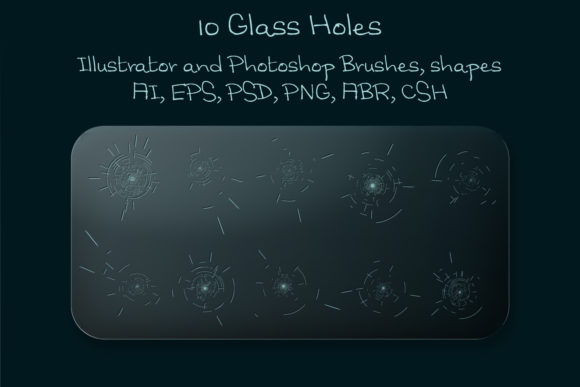
When you are working on a project that requires a gritty, intense atmosphere—whether it is a movie poster, a video game interface, or a book cover—details matter. You cannot simply draw a jagged circle and expect it to look like shattered glass. The physics of a bullet hitting a pane of glass is complex, involving radial cracks, concentric circles, and a central point of impact. This is exactly why having high-quality design assets is crucial. The 10 Glass Bullet Holes Brushes set is a collection specifically engineered to bring that level of realism to your canvas without requiring you to hand-draw every crack.
This package is more than just a few stamps; it is a versatile toolkit for modern typography and graphic design. It includes vector shapes, scattered brushes, and high-definition files that allow you to apply these effects to mirrors, screens, and windows in your artwork. The appeal here lies in the "scattered" nature of the brushes. Instead of applying a single, repetitive stamp that looks artificial, these tools allow for a natural distribution of debris and cracks. This mimics the chaotic reality of impact damage, giving your projects an authentic, high-stakes vibe.
Versatility Across Formats: From Vector to HD
One of the biggest challenges designers face is maintaining quality across different mediums. A texture that looks great on a web banner might turn into a pixelated mess on a large-format print. The creators of the 10 Glass Bullet Holes Brushes have addressed this by providing a comprehensive suite of files. You get a Photoshop file (.CSH) for custom shapes, an ABR file for brushes sized at 2000 pixels, and a Layered PSD file for maximum control. However, the inclusion of a vector EPS 10 file and an Adobe Illustrator 10 file is what sets this apart for professional use.
If you are working on packaging design or large-scale editorial design, vector capabilities are non-negotiable. The vector EPS and Ai files ensure that you can scale these bullet holes to the size of a billboard without losing a single pixel of sharpness. This makes the set a true premium font alternative for graphic elements—offering the scalability usually reserved for high-end typeface families. Whether you are using Photoshop PS3 or the latest version of Illustrator, the compatibility ensures a smooth workflow. You can easily change the color and size to match your specific color palette, integrating seamlessly into existing brand identity guidelines.
Practical Applications in Branding and Marketing
While this set is obviously perfect for action movie posters or gritty web design mockups, its utility extends into more nuanced areas of creative work. Think about the booming market of escape room marketing, true-crime podcast branding, or even edgy streetwear logo design. In these contexts, the glass bullet hole effect is not just a texture; it is a narrative device. It signals danger, mystery, and excitement to the viewer instantly.
For social media graphics, where grabbing attention in a split second is vital, using these assets can create a focal point that demands engagement. Imagine a promotional image for a suspense novel where the title text appears to be behind a shattered window. This use of visual hierarchy draws the eye directly to the message. It is a practical way to apply modern typography principles—using texture to create contrast and depth. Unlike static stock images, these design assets are flexible. Because they include a transparent PNG and a Layered PSD, you can blend them with different layer modes (like Multiply or Overlay) to match the lighting conditions of your background image perfectly.
Integrating Texture into Your Design Workflow
Adopting new assets into your workflow should be about efficiency and enhancement. When evaluating the 10 Glass Bullet Holes Brushes, consider how they fit with your existing library. Do you have a sans serif font that needs a bit of edge? Pairing a clean, geometric typeface with a chaotic, shattered glass overlay creates a compelling font pairing of order and disorder. This is a common strategy in creative font usage—balancing readability with stylistic flair.
Here is a practical guide for getting the most out of this set:
- Layer Management: Always apply the brushes on a separate layer. This allows you to adjust the opacity or use masks to erase parts of the crack that might cover important facial features or text in your brand identity materials.
- Color Grading: Bullet holes in glass often have a slight blue or grey tint due to the lamination of the glass. Don't just use pure black. Try using a very dark desaturated blue to add that extra touch of realism to your print or digital projects.
- Scale Variation: If you are creating a scene with depth, use the vector files to create larger holes in the foreground and smaller ones in the background. This reinforces the perspective of your scene.
Ultimately, the goal of any design asset is to help you tell a better story. Whether you are a freelancer working on a client's horror game or a small business owner creating flyers for a Halloween event, having access to high-fidelity, scalable tools like the 10 Glass Bullet Holes Brushes allows you to produce professional-grade work quickly. It bridges the gap between a concept in your head and a polished final product, ensuring that the "damage" in your art looks intentional, artistic, and undeniably real.